Table of Contents
- The Mobile Constraints: Character Limits and Truncation
- Leveraging Preheader Text as a Secondary Subject Line
- Visual Engagement: Emojis and Formatting
- Refining Strategy Through A/B Testing
- Avoiding Mobile-Specific Spam Triggers
- Frequently Asked Questions
The Mobile Constraints: Character Limits and Truncation
Most emails are now opened on mobile devices. Unlike desktop clients that display 60+ characters, mobile interfaces impose strict physical constraints.
Defining the Optimal Character Count
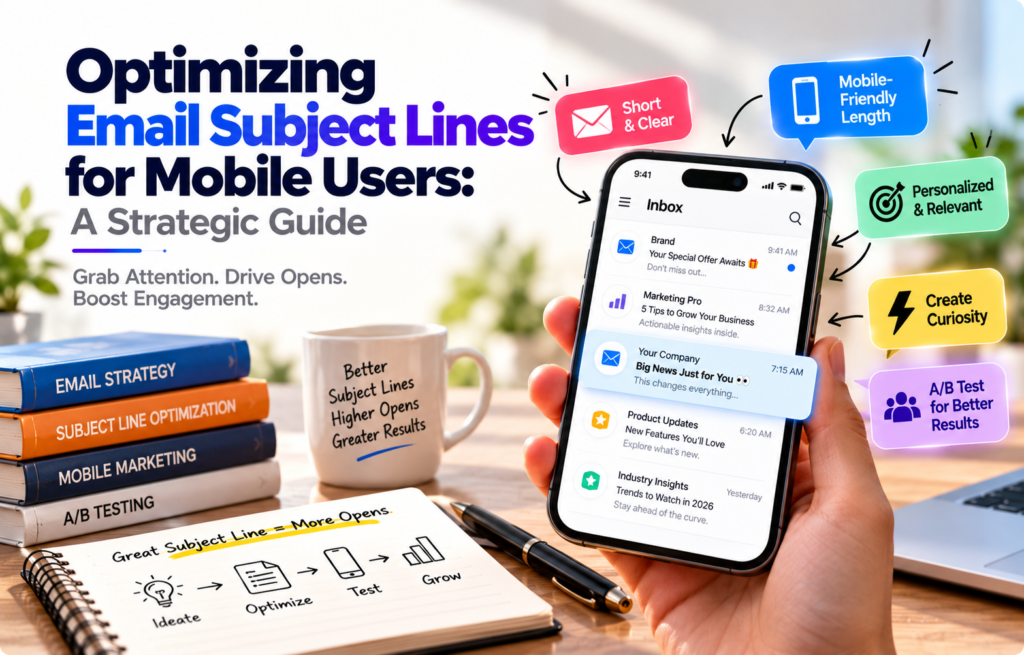
Mobile screens typically cut off subject lines after 30 to 40 characters (roughly 4 to 7 words), replacing the remainder with an ellipsis. Treat the first 35 characters as your primary canvas.
- Weak (Truncated): Our annual summer sale is finally here with discounts up to…
- Strong (Front-Loaded): 50% Off Summer Sale: Sitewide access starts now
Why Truncation Happens
Truncation depends on more than screen size. Email clients like Apple Mail, Gmail, and Outlook allocate space based on device resolution, user-selected font scaling, and orientation.
When your value proposition sits at the end of a long subject line, mobile users miss it. Front-load your core benefit or urgency trigger in the first three words so the reader grasps the intent even if the text is cut off.
—
Leveraging Preheader Text as a Secondary Subject Line
The preheader is the snippet of text pulled from your email body that displays alongside or below the subject line.
Writing Complementary Preheaders
View the preheader as an extension of your subject line. Use them as a one-two punch: the subject line grabs attention, while the preheader provides context or a secondary hook.
- Subject Line: Your security audit is ready
- Preheader: Review 3 critical recommendations from your Q3 assessment.
Avoid generic system copy like "View this email in your browser." This wastes valuable inbox real estate.
Maximizing the Inbox Preview Space
Mobile devices typically stack the sender name, subject line, and preview text in a two-to-three-line block. Because vertical space is limited, this visual block determines whether a user taps or swipes to archive. Ensure your sender name is recognizable, the subject line defines the topic, and the preheader adds depth.
—
Visual Engagement: Emojis and Formatting
Visual cues help emails stand out, but poor execution backfires on small screens.
The Role of Emojis
A single, relevant emoji can replace a word to save space, but overuse creates visual friction.
- Brand alignment: B2B audiences generally prefer minimal or no emojis, while B2C retail may benefit from seasonal symbols.
- Device rendering: Emojis render differently across operating systems; icons that look clean on iOS may appear cluttered on older Android devices.
- Screen readers: Accessibility tools read the full text description of an emoji aloud, which can disrupt the user experience for visually impaired subscribers.
Formatting for Readability
Avoid unusual Unicode characters, stylized fonts, or irregular spacing. These often cause rendering errors, such as "tofu" boxes or broken code. Use standard title case or sentence case consistently across your campaigns.
—
Refining Strategy Through A/B Testing
Optimizing for mobile is an iterative process requiring rigorous testing.
Setting Up Mobile-Specific Tests
- Segment your audience: Isolate users with a history of mobile opens.
- Test one variable: Compare subject lines under 35 characters against 50–60 character variants while keeping the preheader identical.
- Ensure statistical significance: Run tests across large sample sizes before deploying the winner to your full list.
Analyzing Data
Open rates can be inflated by privacy features like Apple's Mail Privacy Protection. To measure true engagement, track:
- Click-to-Open Rate (CTOR): Did the subject line set accurate expectations?
- Mobile Conversion Rate: Did the user complete the intended action after opening?
- Unsubscribe/Spam Rates: Did the subject line generate negative feedback?
—
Avoiding Mobile-Specific Spam Triggers
Aggressive copywriting triggers both automated spam filters and manual user complaints.
Common Spam Triggers
- Misleading prefixes: Never use "RE:" or "FWD:" to manufacture false familiarity.
- Exaggerated claims: Phrases like "100% FREE" or "Guaranteed" trigger skepticism.
- Excessive capitalization: All-caps text takes up more horizontal space and looks like shouting.
- Punctuation clusters: Multiple exclamation points or question marks signal low-quality, spammy outreach.
Maintaining Professionalism
On a small screen, high-pressure copy appears more intense. Maintain a direct, calm tone. State the value clearly and allow the recipient to make an informed decision.
—
Frequently Asked Questions
How many characters should an email subject line be for mobile?
Aim for 30 to 40 characters (about 4 to 7 words) to ensure the full message remains visible.
Why do my subject lines get cut off?
Subject lines are truncated due to screen width limits, responsive design, and user-defined font scaling settings.
Do emojis improve open rates?
They can increase visibility, but their success depends on your industry. Relevance is more important than decoration.
How does the preheader affect mobile open rates?
The preheader acts as a secondary subject line, providing extra space to emphasize value and encourage an open.
What are the best practices for mobile-friendly email?
Keep subject lines short, front-load key info, pair them with a supporting preheader, test across devices, and avoid spammy punctuation or capitalization.